
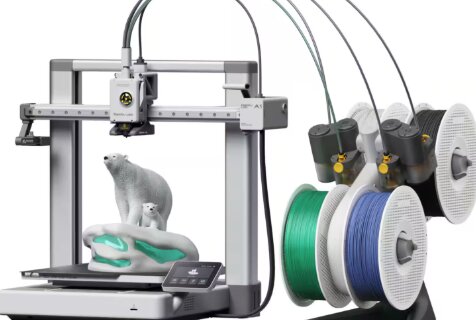
3D printers have become faster, easier to use, and more capable than ever before. Features that were once reserved for expensive enthusiast machines, such as automatic bed leveling, CoreXY motion systems, enclosed chambers, and multi-color printing—are now available at prices that fit within a reasonable budget.
For hobbyists, makers, small businesses, educators, and beginners, the $500 price range represents one of the best value segments in the entire 3D printing market. You can now purchase a machine capable of producing high-quality prototypes, functional parts, decorative models, cosplay accessories, and multi-color prints without spending thousands of dollars.
However, not all printers deliver the same experience. Some prioritize speed, others focus on reliability, while a growing number are designed around multi-color printing and automation.
After comparing print quality, speed, ease of use, software ecosystem, multi-color capabilities, build volume, reliability, and overall value, one printer stood out as the strongest overall choice.
1st Place Goes To: Anycubic Kobra S1C
Why It’s Top Choice:
The Anycubic Kobra S1C delivers one of the most complete 3D printing experiences currently available under $500.
It combines a fully enclosed CoreXY design, built-in filament drying, automatic calibration, multi-color printing support, high-speed performance, and beginner-friendly operation into a package that is difficult to beat at this price point.
Unlike many competing printers, the Kobra S1C focuses not only on printing speed but also on reducing common printing failures. The integrated filament drying system, enclosed build chamber, automatic calibration tools, and smart software ecosystem help improve reliability while minimizing the amount of manual tuning required.
For users who want a printer that can grow with their skills while remaining approachable for beginners, the Kobra S1C offers exceptional value.
Best 3D Printer Under $500: Our Top Picks
1. Anycubic Kobra S1C – Best Overall 3D Printer Under $500
Pros
✓ Built-in filament drying system
✓ Fully enclosed CoreXY design
✓ Up to 600mm/s printing speed
✓ Excellent multi-color printing capabilities
✓ Automatic calibration and bed leveling
✓ Smart app and remote control support
✓ Beginner-friendly operation
Cons
✕ Multi-color expansion requires additional hardware
✕ Larger footprint than some open-frame competitors
Specifications
| Feature | Specification |
|---|---|
| Print Technology | FDM |
| Motion System | CoreXY |
| Maximum Speed | 600mm/s |
| Enclosure | Fully Enclosed |
| Auto Bed Leveling | Yes |
| Multi-Color Printing | Up to 8 Colors |
| Filament Drying | Built-In |
| Connectivity | App, LAN, USB |
| Target User | Beginners to Advanced |
The Anycubic Kobra S1C earns the top position because it addresses many of the frustrations that traditionally come with desktop 3D printing.
One of the most unique features is the integrated filament drying system. Moisture is one of the leading causes of failed prints, stringing, inconsistent extrusion, and poor surface quality. Most printers require users to purchase a separate filament dryer, but the Kobra S1C integrates this functionality directly into the ecosystem.
For beginners, this alone can significantly improve printing success rates.
The printer’s CoreXY motion system is another major advantage. Compared to traditional Cartesian designs, CoreXY systems allow faster movement while maintaining accuracy. The Kobra S1C reaches speeds of up to 600mm/s, allowing users to complete projects significantly faster than older-generation machines.
Speed alone means little if print quality suffers, but Anycubic has incorporated vibration compensation, flow calibration, and automatic tuning features that help maintain quality even during high-speed operation.
The fully enclosed chamber is another feature often found on more expensive machines. An enclosure helps regulate temperature during printing, which is especially beneficial when working with materials such as ABS and other engineering-grade filaments.
Multi-color printing is becoming increasingly popular, and the Kobra S1C embraces this trend. Users can connect multiple ACE Pro units to achieve up to eight-color printing, opening up possibilities for cosplay props, display models, decorative pieces, and creative projects.
Ease of use is where the Kobra S1C truly shines. Automatic bed leveling, vibration compensation, flow calibration, remote monitoring, and quick-swap nozzles dramatically reduce the learning curve.
Instead of spending hours adjusting settings, users can focus on printing.
For most buyers shopping under $500, the Anycubic Kobra S1C offers the best balance of speed, reliability, features, and future expandability.
2. Bambu Lab P1S Combo – Best High-Speed Multi-Color Printer
Pros
✓ Excellent print quality
✓ Mature AMS multi-color system
✓ Fully enclosed design
✓ Extremely fast printing
✓ Reliable automatic bed leveling
✓ Strong software ecosystem
Cons
✕ AMS system adds additional complexity
✕ Slightly less beginner-friendly than the Kobra S1C
Specifications
| Feature | Specification |
|---|---|
| Print Technology | FDM |
| Motion System | CoreXY |
| Maximum Speed | 500mm/s |
| Enclosure | Fully Enclosed |
| Auto Bed Leveling | Yes |
| Multi-Color Printing | Up to 16 Colors |
| Acceleration | 20,000 mm/s² |
| Setup Time | Approximately 15 Minutes |
| Target User | Intermediate to Advanced |
Bambu Lab has become one of the most influential brands in consumer 3D printing, and the P1S Combo demonstrates exactly why.
At first glance, the specifications appear similar to many modern CoreXY printers. However, what separates the P1S Combo is the maturity of its overall ecosystem.
The included AMS system allows multi-color and multi-material printing with support for up to sixteen colors. While most users won’t regularly print with sixteen colors simultaneously, the capability demonstrates how expandable the platform can become.
For creators who produce display models, figurines, cosplay components, or product prototypes, the AMS system unlocks creative possibilities that are difficult to achieve with traditional single-color printers.
Speed is another area where the P1S excels. With print speeds reaching 500mm/s and acceleration up to 20,000 mm/s², projects that once required a full day can often be completed in a fraction of the time.
The enclosed design contributes to material flexibility. Users can print PLA and PETG with ease while also exploring materials such as ABS, ASA, TPU, and more advanced engineering filaments.
Automatic bed leveling further simplifies operation, reducing setup time and helping ensure successful first layers.
One of the biggest strengths of the P1S is the software experience. Bambu Studio has developed a reputation as one of the most polished slicers available, and the cloud-connected ecosystem makes printer management straightforward.
While the P1S Combo is exceptionally capable, the Anycubic Kobra S1C ultimately earns the top position because of its integrated filament drying system and slightly more beginner-focused design.
Nevertheless, the P1S remains one of the strongest options available under $500.
3. ELEGOO Centauri Carbon 2 Combo – Best for Advanced Materials
Pros
✓ 350°C high-temperature nozzle
✓ Four-color printing system
✓ Excellent material compatibility
✓ Fully automatic calibration
✓ High-speed CoreXY architecture
✓ Strong engineering-material support
Cons
✕ Newer ecosystem than competitors
✕ Less community support than Bambu Lab
Specifications
| Feature | Specification |
|---|---|
| Print Technology | FDM |
| Motion System | CoreXY |
| Maximum Speed | 500mm/s |
| Nozzle Temperature | 350°C |
| Build Volume | 256 x 256 x 256mm |
| Auto Leveling | Yes |
| Multi-Color Printing | 4 Colors |
| Frame | Aluminum |
| Target User | Enthusiasts and Advanced Users |
The ELEGOO Centauri Carbon 2 Combo focuses on versatility.
While many printers perform exceptionally well with standard PLA, the Centauri Carbon 2 is designed to handle a broader range of materials.
The 350°C high-temperature nozzle expands compatibility into engineering-grade materials that are often difficult to print on budget machines. This makes the printer attractive for users creating functional parts, prototypes, mechanical components, and technical projects.
The printer’s CoreXY architecture allows speeds up to 500mm/s while maintaining impressive dimensional accuracy.
ELEGOO has also invested heavily in automation. Auto-leveling, automatic calibration, filament monitoring, and active vibration compensation all contribute to a smoother printing experience.
The CANVAS multi-color system enables four-color printing while automatically managing filament changes and detecting issues before they ruin a print.
Print quality is consistently impressive, particularly when working with demanding materials.
For users interested in experimenting beyond standard PLA, the Centauri Carbon 2 offers capabilities that few competitors in this price range can match.
4. FLASHFORGE AD5X – Best Budget Multi-Color Productivity Printer
Pros
✓ Four-color printing support
✓ 600mm/s maximum speed
✓ Intelligent Filament System
✓ Full automatic calibration
✓ Compact footprint
✓ Excellent value
Cons
✕ Smaller ecosystem than Bambu Lab
✕ Less proven long-term track record
Specifications
| Feature | Specification |
|---|---|
| Print Technology | FDM |
| Motion System | CoreXY |
| Maximum Speed | 600mm/s |
| Auto Bed Leveling | Yes |
| Multi-Color Printing | 4 Colors |
| Filament System | Intelligent Filament System |
| Vibration Compensation | Yes |
| Target User | Beginners and Hobbyists |
The FLASHFORGE AD5X rounds out our list by offering one of the most affordable entries into high-speed multi-color printing.
Many budget printers require users to sacrifice features, but the AD5X includes automatic leveling, vibration compensation, CoreXY motion, and multi-color capabilities.
Its Intelligent Filament System simplifies multi-material printing while helping prevent interruptions caused by filament shortages or feeding issues.
The compact design is another advantage. Users with limited workspace may find the AD5X easier to accommodate than some of the larger competitors on this list.
Despite its lower price, performance remains impressive. Speeds up to 600mm/s allow users to complete projects quickly while maintaining respectable print quality.
For hobbyists who want modern features without stretching their budget, the AD5X represents strong value.
Product Comparison Table
| Printer | Speed | Multi-Color | Enclosed | Auto Leveling | Best For |
|---|---|---|---|---|---|
| Anycubic Kobra S1C | 600mm/s | Up to 8 Colors | Yes | Yes | Overall Value |
| Bambu Lab P1S Combo | 500mm/s | Up to 16 Colors | Yes | Yes | Multi-Color Ecosystem |
| ELEGOO Centauri Carbon 2 Combo | 500mm/s | 4 Colors | Yes | Yes | Advanced Materials |
| FLASHFORGE AD5X | 600mm/s | 4 Colors | No | Yes | Budget Multi-Color Printing |
Frequently Asked Questions
What is the best 3D printer under $500?
The Anycubic Kobra S1C is our top recommendation. It combines high-speed CoreXY performance, automatic calibration, built-in filament drying, multi-color printing support, and a fully enclosed design at an exceptional value.
Is a CoreXY printer better than a traditional Cartesian printer?
For many users, yes. CoreXY printers generally offer higher speeds, smoother motion, and better overall efficiency while maintaining print quality.
Do beginners need automatic bed leveling?
Absolutely. Automatic bed leveling eliminates one of the most frustrating aspects of 3D printing and significantly improves first-layer success rates.
Is multi-color printing worth it?
For hobbyists, creators, cosplay builders, and model makers, multi-color printing can dramatically reduce painting and post-processing work.
Which printer is best for beginners?
The Anycubic Kobra S1C is the most beginner-friendly option on this list thanks to its automatic calibration features, integrated filament drying, and simplified workflow.
Final Verdict
Choosing the best 3D printer under $500 ultimately comes down to balancing print quality, speed, ease of use, and long-term value.
After comparing all four machines, the Anycubic Kobra S1C earns our top recommendation. Its combination of 600mm/s CoreXY performance, fully enclosed design, automatic calibration, integrated filament drying system, smart connectivity, and multi-color capabilities make it one of the most complete printers available in this price range.
The Bambu Lab P1S Combo remains an outstanding choice for users who prioritize a mature multi-color ecosystem. The ELEGOO Centauri Carbon 2 Combo excels for advanced materials and engineering applications, while the FLASHFORGE AD5X offers exceptional value for buyers seeking affordable multi-color printing.
Our Final Rankings
- Anycubic Kobra S1C – Best Overall 3D Printer Under $500
- Bambu Lab P1S Combo – Best Multi-Color Ecosystem
- ELEGOO Centauri Carbon 2 Combo – Best for Advanced Materials
- FLASHFORGE AD5X – Best Budget Multi-Color Printer
For most buyers, the Anycubic Kobra S1C delivers the strongest combination of features, reliability, performance, and ease of use, making it our top choice for the best 3D printer under $500 in 2026.