
Moisture is one of the most common causes of poor print quality in 3D printing. Even a high-end printer can produce weak, stringy, or rough-looking prints when filament absorbs water from the air.
Many 3D printing materials are hygroscopic, meaning they naturally attract and absorb moisture from their surroundings. Once moisture enters the filament, it turns into steam inside the hotend during printing, creating a variety of frustrating print defects.
Learning how to dry filament properly can dramatically improve print quality, reduce failed prints, and extend the life of your filament spools.
This guide explains how filament absorbs moisture, how to identify wet filament, and the safest methods for drying different filament types.
Why Filament Absorbs Moisture
Most thermoplastics used in 3D printing contain microscopic spaces that allow water molecules to enter the material over time.
The amount of moisture absorbed depends on several factors:
- Filament type
- Relative humidity
- Storage conditions
- Exposure duration
- Ambient temperature
Some materials absorb moisture within days, while others may remain usable for months before showing signs of degradation.
Filaments most susceptible to moisture include:
- Nylon
- TPU
- PETG
- PVA
- Polycarbonate
- ABS
PLA absorbs moisture more slowly but can still benefit from drying, especially after prolonged exposure.
Signs Your Filament Needs Drying
Many printing problems commonly blamed on printer settings are actually caused by wet filament.
Excessive Stringing
One of the first signs of moisture contamination is increased stringing between parts.
Water vapor escaping from the nozzle creates fine strands of plastic that stretch across printed features.
Popping or Crackling Sounds
If you hear popping, hissing, or crackling during printing, moisture is likely evaporating inside the hotend.
These sounds occur when trapped water rapidly turns into steam.
Rough Surface Finish
Wet filament often produces:
- Uneven layers
- Surface pitting
- Tiny bubbles
- Blobs and zits
The resulting print may feel rough compared to prints made with dry material.
Weak Layer Adhesion
Steam generated during extrusion can disrupt bonding between layers.
This often leads to:
- Brittle parts
- Delamination
- Reduced impact strength
- Poor durability
Inconsistent Extrusion
Moisture can create fluctuating extrusion pressure, resulting in:
- Under-extrusion
- Over-extrusion
- Visible gaps
- Uneven layer lines
Which Filaments Need Drying Most Often?
Nylon
Nylon is among the most hygroscopic filaments available.
In humid environments, nylon can absorb significant moisture within a single day.
Frequent drying is almost mandatory for consistent results.
TPU
Flexible filaments absorb moisture quickly and often develop severe stringing when wet.
Drying TPU before printing can significantly improve print quality.
PETG
PETG is less moisture-sensitive than nylon but still benefits from drying after extended storage.
Stringing and surface defects are common indicators of wet PETG.
Polycarbonate
Polycarbonate requires extremely dry conditions for optimal printing.
Even small amounts of moisture can affect strength and surface quality.
PLA
PLA absorbs moisture more slowly but is not immune.
Older PLA spools often print noticeably better after drying.
Best Methods for Drying Filament
Several methods can effectively remove moisture from filament.
Use a Dedicated Filament Dryer
A filament dryer is the safest and most reliable option.
These devices are specifically designed to:
- Maintain precise temperatures
- Circulate warm air
- Remove moisture gradually
- Prevent overheating
Benefits include:
- Consistent results
- Reduced risk of damage
- Ability to print directly from the dryer
- Suitable for most filament types
For frequent printing, a dedicated dryer is often worth the investment.
Use a Food Dehydrator
Food dehydrators are a popular alternative among hobbyists.
They provide:
- Even heat distribution
- Good airflow
- Large drying capacity
Many users modify dehydrators slightly to accommodate larger spools.
A quality dehydrator can perform nearly as well as dedicated filament dryers.
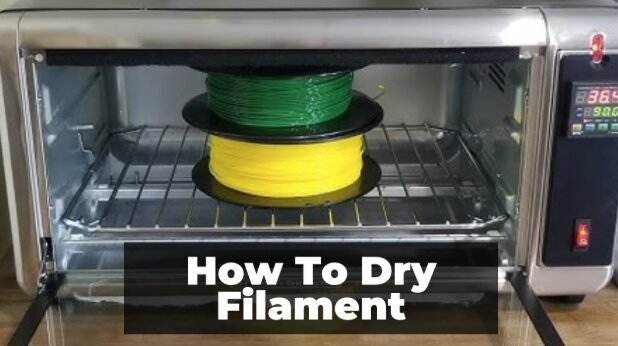
Use a Convection Oven Carefully
A convection oven can dry filament effectively, but caution is required.
Household ovens frequently fluctuate in temperature and may exceed the desired setting.
Even small temperature spikes can deform filament spools.
If using an oven:
- Verify temperature with an independent thermometer
- Use the lowest practical setting
- Monitor the process closely
- Avoid placing filament near heating elements
Many experienced makers consider ovens the riskiest drying method.
Recommended Drying Temperatures
Different materials require different drying temperatures.
PLA
- Temperature: 40–45°C
- Duration: 4–6 hours
PETG
- Temperature: 60–65°C
- Duration: 4–6 hours
ABS
- Temperature: 65–70°C
- Duration: 4–6 hours
TPU
- Temperature: 45–55°C
- Duration: 4–6 hours
Nylon
- Temperature: 70–80°C
- Duration: 8–12 hours
Polycarbonate
- Temperature: 75–85°C
- Duration: 8–12 hours
Always verify manufacturer recommendations before drying any filament.
How to Dry Filament Step by Step
Step 1: Identify the Material
Check the spool label or manufacturer specifications.
Different materials tolerate different drying temperatures.
Step 2: Inspect the Filament
Look for signs of moisture such as:
- Stringing
- Brittleness
- Surface defects
- Audible popping
This helps determine whether drying is necessary.
Step 3: Set the Correct Temperature
Choose the recommended drying temperature for the specific filament type.
Avoid increasing temperatures to speed up the process.
Step 4: Allow Sufficient Drying Time
Proper drying takes several hours.
Rushing the process often leaves moisture trapped inside the filament.
Step 5: Test Print
After drying, print a small calibration model.
Compare print quality before and after drying to verify improvement.
Can You Overdry Filament?
In most cases, no.
The greater risk comes from excessive heat rather than excessive drying time.
Problems occur when temperatures approach the filament’s glass transition temperature.
This can cause:
- Spool deformation
- Filament sticking together
- Diameter inconsistencies
- Printing issues
Maintaining the correct temperature is far more important than shortening drying time.
How to Keep Filament Dry After Drying
Drying filament solves only half the problem.
Proper storage prevents moisture from returning.
Use Airtight Containers
Store filament in:
- Sealed storage bins
- Vacuum bags
- Dry boxes
Limiting air exposure significantly slows moisture absorption.
Add Desiccants
Silica gel packs help maintain low humidity levels inside storage containers.
Replace or recharge desiccants periodically for maximum effectiveness.
Use Dry Boxes During Printing
Some materials continue absorbing moisture while being printed.
Dry boxes allow filament to remain protected throughout the printing process.
This is especially valuable for:
- Nylon
- TPU
- Polycarbonate
- PETG
Monitor Humidity
Small digital hygrometers are inexpensive and provide useful feedback on storage conditions.
Many users aim for humidity levels below 20% inside filament storage containers.
Common Mistakes When Drying Filament
Using Temperatures That Are Too High
Excess heat can ruin an entire spool.
Always follow manufacturer guidelines.
Assuming New Filament Is Dry
Factory-sealed filament is not always perfectly dry.
Some materials arrive with enough moisture to affect print quality.
Drying for Too Little Time
Moisture removal takes time.
Surface moisture disappears quickly, but internal moisture requires several hours.
Ignoring Storage Conditions
Drying without proper storage simply allows moisture to return.
Long-term storage is just as important as drying.
Is Drying Filament Really Necessary?
For some materials, occasional drying may not make a noticeable difference.
For others, especially nylon and TPU, drying can completely transform print quality.
If you experience:
- Stringing
- Popping noises
- Weak parts
- Rough surfaces
- Inconsistent extrusion
Drying filament should be one of the first troubleshooting steps.
Many print-quality issues disappear once moisture is removed from the material.
Frequently Asked Questions
How long does it take to dry filament?
Most filaments require 4 to 6 hours. Moisture-sensitive materials like nylon may need 8 to 12 hours.
Can I dry filament in a regular oven?
Yes, but it carries risks. Household ovens often have inaccurate temperature control and may damage filament.
How do I know if filament is dry?
Print quality usually improves immediately. Stringing, popping noises, and rough surfaces often disappear after successful drying.
Does PLA need drying?
PLA absorbs moisture more slowly than many other materials, but older spools can still benefit from drying.
Can wet filament damage a printer?
Wet filament typically does not damage the printer itself, but it can lead to poor print quality, nozzle contamination, and unnecessary troubleshooting.
Final Thoughts
Understanding how to dry filament is an essential skill for every 3D printing enthusiast. Moisture can negatively affect surface finish, dimensional accuracy, strength, and overall print consistency.
A dedicated filament dryer or food dehydrator offers the safest and most reliable solution. Combined with proper storage practices, drying filament can eliminate many common printing problems before they start.
Whether you’re printing with PLA, PETG, TPU, nylon, or polycarbonate, keeping filament dry is one of the simplest ways to achieve cleaner prints and more reliable results.